Invoice Settings
Configure invoice numbering and default content for your organization
Overview
Invoice Settings let you control how invoice numbers are generated and set default content for new invoices. This saves time and ensures consistency across all your invoices.
Only organization owners can edit invoice settings.
Accessing Invoice Settings
Open invoice settings from the centralized settings hub:
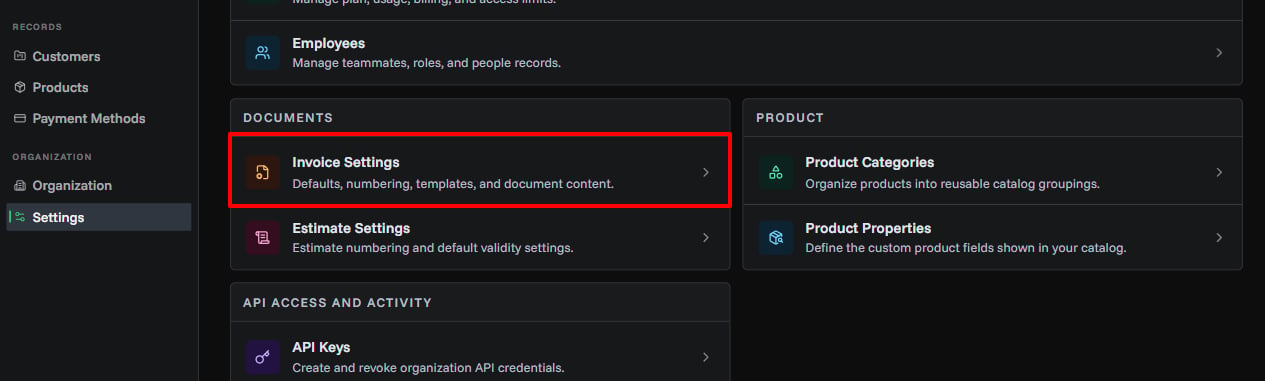
- Open Settings
- In Documents, click Invoice Settings
- Click the Edit Settings button (owners only)
Invoice Number Generation
Control how invoice numbers are automatically created for each new invoice.
Generation Strategy
Choose how your invoice numbers will be formatted:
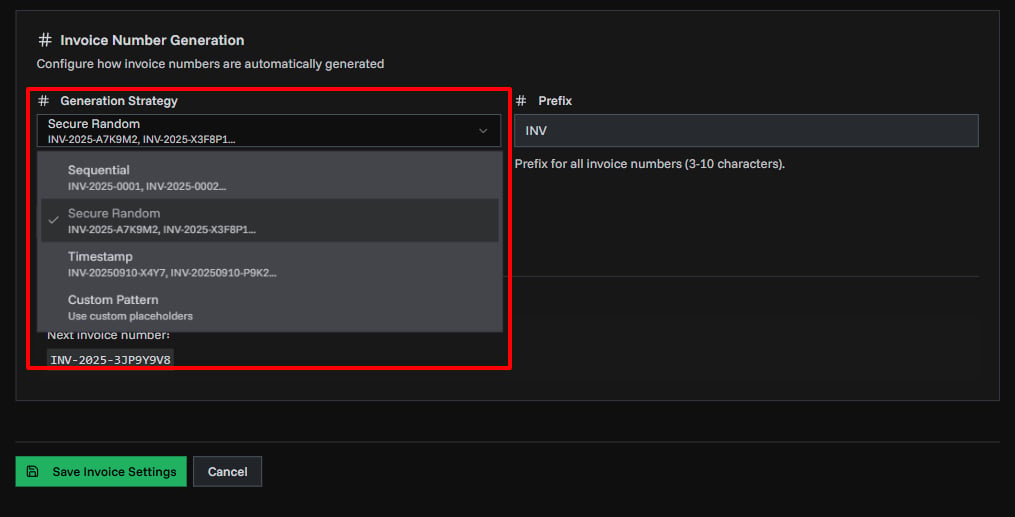
| Strategy | Description | Example | Best For |
|---|---|---|---|
| Sequential | Creates numbered invoices in order | INV-2025-0001, INV-2025-0002 | Small businesses, simple numbering, easy customer reference |
| Secure Random | Generates random alphanumeric codes | INV-2025-A7K9M2, INV-2025-X3F8P1 | Enhanced security, preventing number guessing, high-volume businesses |
| Timestamp | Uses date and time | INV-20250910-X4Y7, INV-20250910-P9K2 | Date-based organization, chronological sorting, time tracking |
| Custom Pattern | Create your own format using placeholders (advanced) | {prefix}-{quarter}-{seq:4} | Complex requirements, multi-department systems, specific compliance needs |
Prefix
Set the prefix that appears at the start of all invoice numbers.
Requirements:
- 3-10 characters
- Examples:
INV,BILL,ORG
Sequence Length
Control how many digits appear in sequential numbers.
Settings:
- Minimum: 4 digits
- Maximum: 10 digits
- Example: Length 4 =
0001, Length 6 =000001
Use longer sequences if you create many invoices per year.
Custom Pattern (Advanced)
Create complex invoice numbers with placeholders.
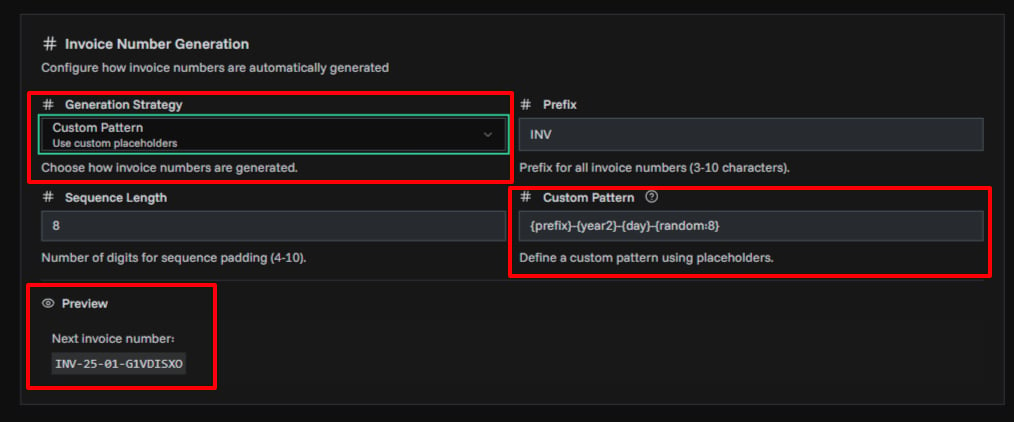
Available Invoice Numbering Pattern:
| Category | Placeholder | Description | Example |
|---|---|---|---|
| Organization | {prefix} | Your organization prefix | INV |
{org} | First 3 characters of organization ID | ABC | |
| Date & Time | {year} | Current year (4 digits) | 2025 |
{year2} | Short year (2 digits) | 25 | |
{month} | Month number | 01-12 | |
{day} | Day of month | 01-31 | |
{quarter} | Quarter | Q1-Q4 | |
{week} | Week number | 01-53 | |
{monthName} | Short month name | Jan, Feb | |
{monthNameFull} | Full month name | January | |
{dayOfWeek} | Day name | Mon, Tue | |
{timestamp} | YYYYMMDD format | 20250101 | |
| Counters & Random | {seq:N} | Sequential number with N digits | {seq:4} → 0001 |
{random:N} | Random string of N characters | {random:4} → X7K9 | |
{uuid:N} | First N characters of UUID | {uuid:6} → A3F8B2 | |
{hex:N} | Random hex string | {hex:4} → 9A2F |
Examples:
| Pattern | Result |
|---|---|
{prefix}-{year}-{seq:4} | INV-2025-0001 |
{org}-{quarter}-{random:4} | ABC-Q1-X7K9 |
{monthName}{day}-{uuid:6} | Jan15-A3F8B2 |
{prefix}-{year2}{month}-{seq:5} | INV-2501-00001 |
{prefix}-{timestamp}-{hex:4} | BILL-20250101-9A2F |
{org}-{year}-{quarter}-{seq:3} | ABC-2025-Q1-001 |
{prefix}{monthName}{year2}-{random:6} | INVJan25-X7K9M2 |
{year}{month}{day}-{seq:4} | 20250115-0001 |
{prefix}-W{week}-{year2}-{random:4} | INV-W03-25-P9K2 |
{dayOfWeek}{monthName}{day}-{uuid:8} | MonJan15-A3F8B2C7 |
Changing invoice number settings doesn't affect existing invoices, only new ones.
Default Invoice Content
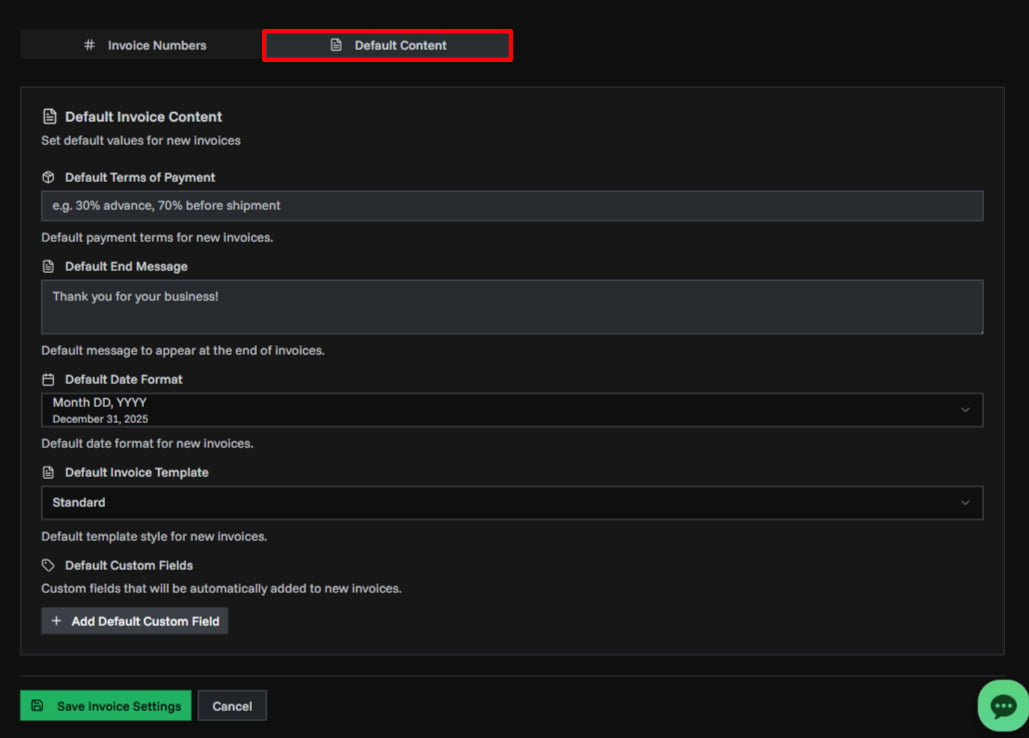
Set default values that automatically fill in when creating new invoices.
Default Terms of Payment
Standard payment terms that appear on all new invoices.
Examples:
- "Payment due within 30 days"
- "30% advance, 70% before shipment"
- "Net 15 days from invoice date"
Default End Message
A closing message that appears at the bottom of invoices.
Examples:
- "Thank you for your business!"
- "We appreciate your partnership"
- "Please contact us with any questions"
Default Date Format
Choose how dates appear on your invoices.
Available Formats:
| Format | Example |
|---|---|
| Month DD, YYYY | December 01, 2025 |
| DD/MM/YYYY | 01/12/2025 |
| MM/DD/YYYY | 12/01/2025 |
| DD-MM-YYYY | 01-12-2025 |
| YYYY-MM-DD | 2025-12-01 |
Default Currency Format
Choose how currency values appear on new invoices by default.
| Format | Example |
|---|---|
| Symbol | $1,234.50 |
| Localized symbol | US$1,234.50 |
| Currency code | USD 1,234.50 |
| Currency name | 1,234.50 US dollars |
| Accounting | ($1,234.50) |
This default is used when opening the invoice generator. You can still change the currency format per invoice while creating or editing it.
Default Invoice Template
Select the visual design for your invoices.
| Template | Description | Best For |
|---|---|---|
| Standard | Balanced default design with clean layout | General business use |
| Bold Professional | Strong dark header with emphasis | Corporate clients, professional services |
| Mono | Clean, minimal monospace design | Tech companies, SaaS, developers |
| Startup Modern | Modern and sleek contemporary style | Startups, creative agencies |
Default Invoice Language
Set the language for invoice PDF labels and text. This controls the language used for section titles, column headers, and other text on generated invoice PDFs.
PineBill Supported Languages:
| Language | Native Name |
|---|---|
| English | English |
| German | Deutsch |
| French | Francais |
| Spanish | Espanol |
| Portuguese | Portugues |
| Italian | Italiano |
| Arabic | العربية |
| Chinese | 中文 |
| Japanese | 日本語 |
| Korean | 한국어 |
| Turkish | Türkçe |
| Azerbaijani | Azərbaycan dili |
The language setting affects PDF labels like "Bill To", "Invoice Date", "Total", etc. Your custom content (product names, descriptions, messages) remains unchanged.
Default Custom Fields
Add extra fields that automatically appear on new invoices.
What are custom fields? Additional information you want to include on every invoice:
- Purchase Order Number
- Project Reference
- Department Code
- Customer ID
- Contract Number
How to add:
- Click Add Default Custom Field
- Enter the Label (field name)
- Enter the Value (default content)
- Click the X to remove unwanted fields
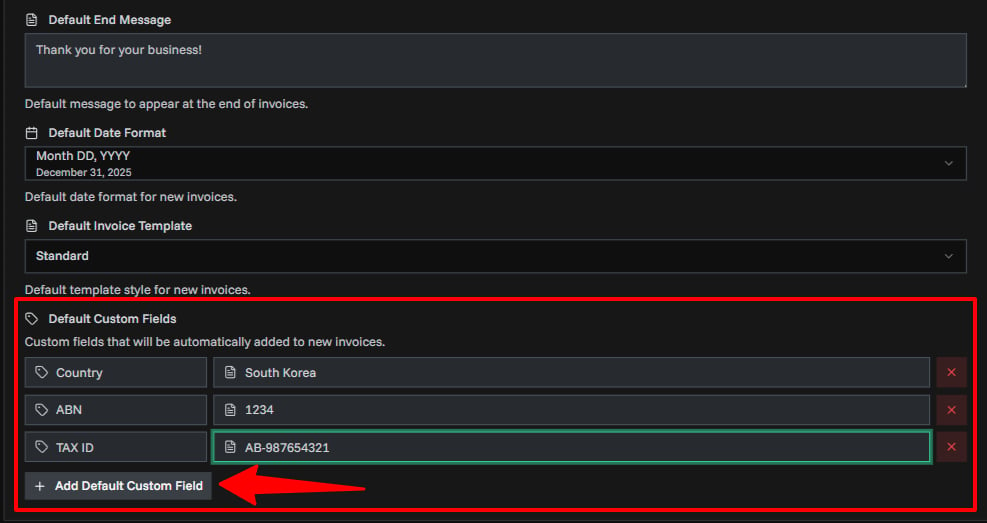
Custom fields can be edited individually when creating each invoice.
Saving Your Settings
After making changes:
- Review all your settings
- Check the invoice number preview
- Click Save Invoice Settings
- Wait for the success message
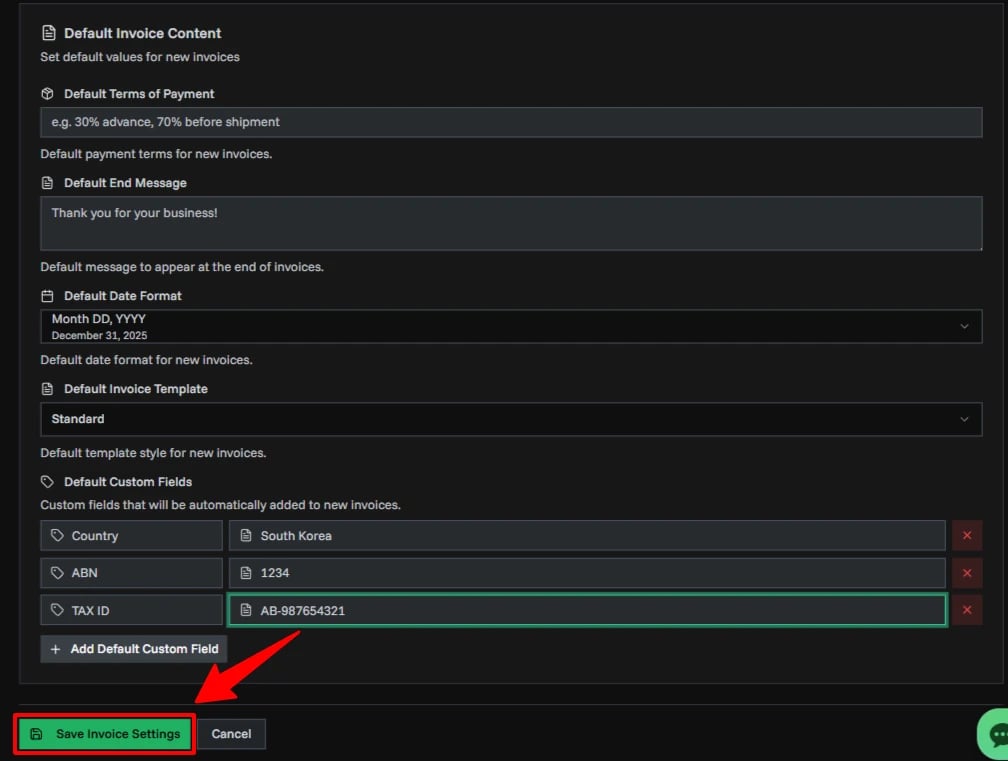
Click Cancel to discard changes and restore previous settings.