Invoices
Invoice Statuses
Overview of different invoice statuses and their meanings in PineBill.
Status Overview
PineBill uses five distinct status codes to track invoice lifecycle:
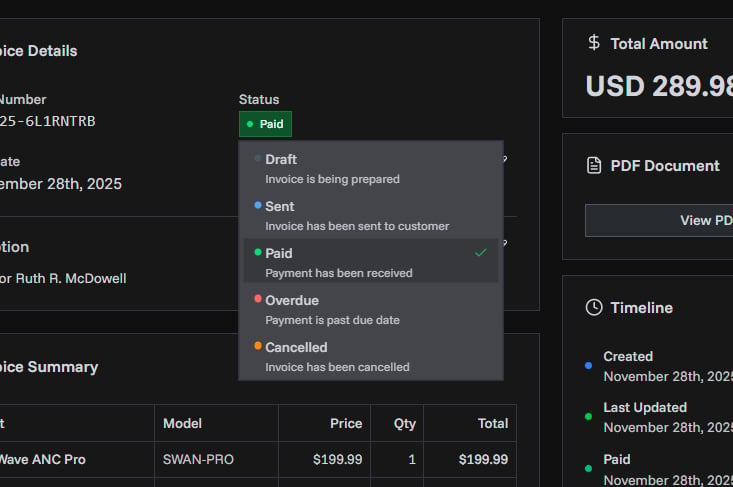
| Status | Purpose | When to Use | Automatic Behavior |
|---|---|---|---|
| ⚪ DRAFT | Invoice is being prepared | Creating new invoice Making edits before sending Incomplete invoice data | None |
| 🔵 SENT | Invoice sent, awaiting payment | Invoice delivered to customer Payment expected Within due date | None |
| 🟢 PAID | Payment received and confirmed | Customer payment received in full Transaction verified | Sets paidDate to current timestampClears paidDate when changed from PAID |
| 🔴 OVERDUE | Payment past due date | Due date has passed Customer payment is late | Manual update required No automatic SENT → OVERDUE transition |
| 🟠 CANCELLED | Invoice voided | Issued in error Customer order cancelled Superseded by corrected version | None |
Status Transitions
Common status workflows:
Standard flow:
DRAFT → SENT → PAIDLate payment flow:
DRAFT → SENT → OVERDUE → PAIDCancelled flow:
DRAFT → CANCELLED
SENT → CANCELLED
Manual vs Automatic
Manual changes required:
- All status transitions must be manually updated
- No automatic SENT → OVERDUE transition
Automatic behavior:
- PAID status sets
paidDatetimestamp - Changing from PAID clears
paidDate
Changing Status
Single Invoice
You can change the status of a single invoice in two ways:
- From the invoice list: Click on the status badge to open the status selector
- From invoice details: Click the status badge in the invoice details page
Bulk Status Change
Update multiple invoices at once:
- Select invoices using the checkboxes in the invoice list
- Click Change Status in the bulk actions bar
- Choose the new status
- Confirm the change
Bulk status change is useful for marking multiple invoices as paid after receiving a batch payment, or updating sent invoices to overdue status.
Status in Reports
Outstanding balance includes:
- SENT invoices
- OVERDUE invoices
Dashboard metrics show:
- Count per status
- Days overdue calculation for OVERDUE invoices
- Overdue identification:
status IN (SENT, OVERDUE) AND dueDate < today