Invoice Reminders
Automatically remind customers before, on, and after an invoice due date
|1 min read|
PT
PineBill Team
Invoice follow-ups can now run automatically. With Invoice Reminders, PineBill helps you remind customers about unpaid invoices before the due date, on the due date, and after the invoice becomes overdue.
What's New
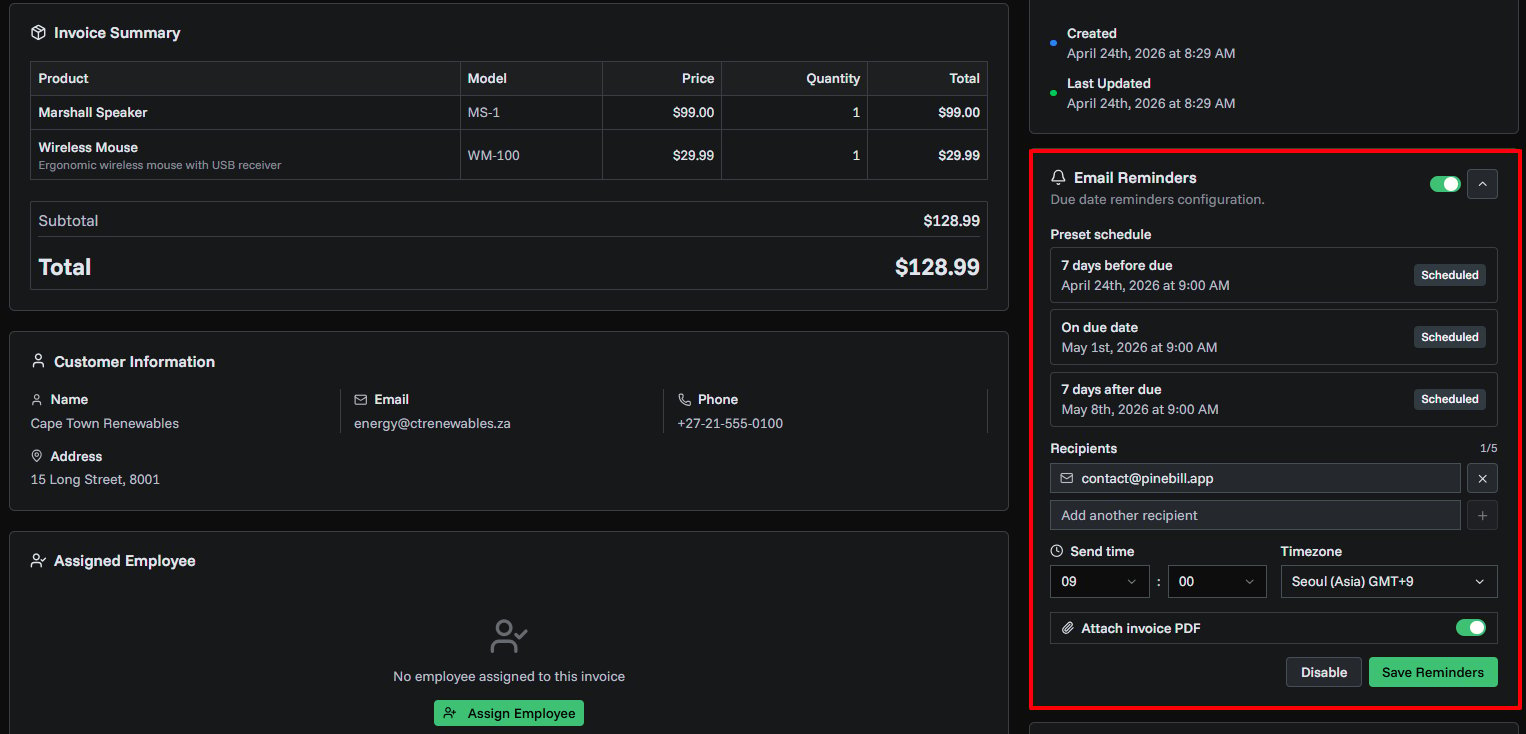
- Automatic reminder schedule — send reminders 7 days before the due date, on the due date, and 7 days after the due date
- Customer-ready emails — each reminder includes the invoice number, amount, due date, company name, and a secure invoice link
- Multiple recipients — add up to 5 recipient email addresses for each invoice
- Timezone-aware sending — choose the send time and timezone for each invoice reminder setup
- Optional PDF attachment — include the invoice PDF in reminder emails when the invoice PDF is available
- Email history tracking — see reminder emails in the invoice email history alongside regular invoice emails
- Smart cancellation — pending reminders stop automatically when an invoice is paid or cancelled
Documentation
Read the full guide for setup steps and troubleshooting.
invoicesremindersemailautomation