AI Assistant
Chat, speak, and take approved actions across your PineBill workspace
|1 min read|
PT
PineBill Team
PineBill Assistant is now available from the dashboard. Use it to ask questions, create records, review business data, and move faster across invoices, customers, products, projects, tasks, expenses, payment methods, employees, and analytics.
What's New
- Text chat — ask PineBill Assistant to find records, summarize work, create items, or answer questions about your workspace
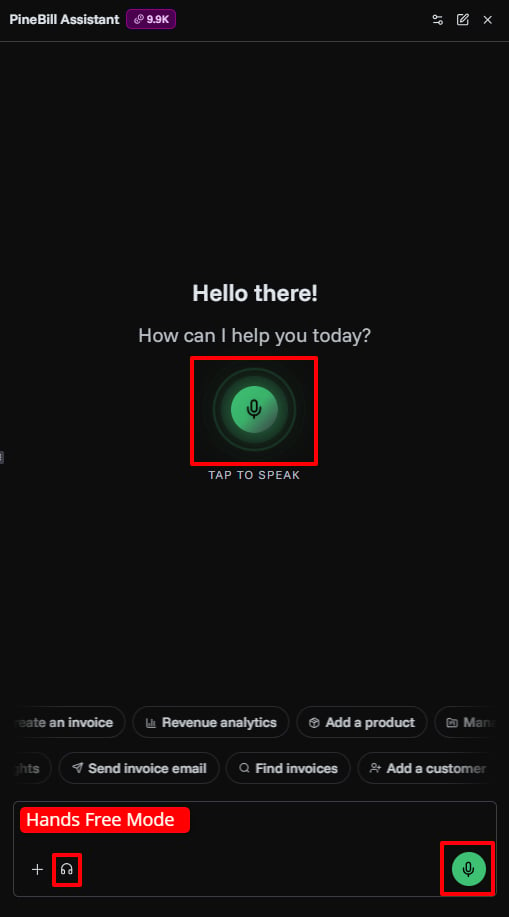
- Voice input — speak requests instead of typing when you want to move quickly
- Hands-free mode — keep voice mode ready after assistant replies for natural follow-up conversations
- Approved actions — review create, update, delete, and email-send actions before PineBill completes them
- File attachments — attach images, PDFs, TXT, CSV, or Markdown files up to 3 MB
- Business tools — work with invoices, estimates, customers, products, payment methods, projects, tasks, expenses, employees, and analytics
- AI credits — track chat and voice usage from the subscription page and top up when needed
Documentation
Read the full guide for available tools, voice mode, AI credits, and example prompts.
aiassistantvoiceproductivity