Faster Product Entry & Mobile Support
Add products inline, edit everything in place, and manage line items on any device
Adding products to invoices and estimates just got a lot smoother. Instead of jumping between dialogs and buttons, you can now do everything right inside the products table.
What changed
Type directly in the table
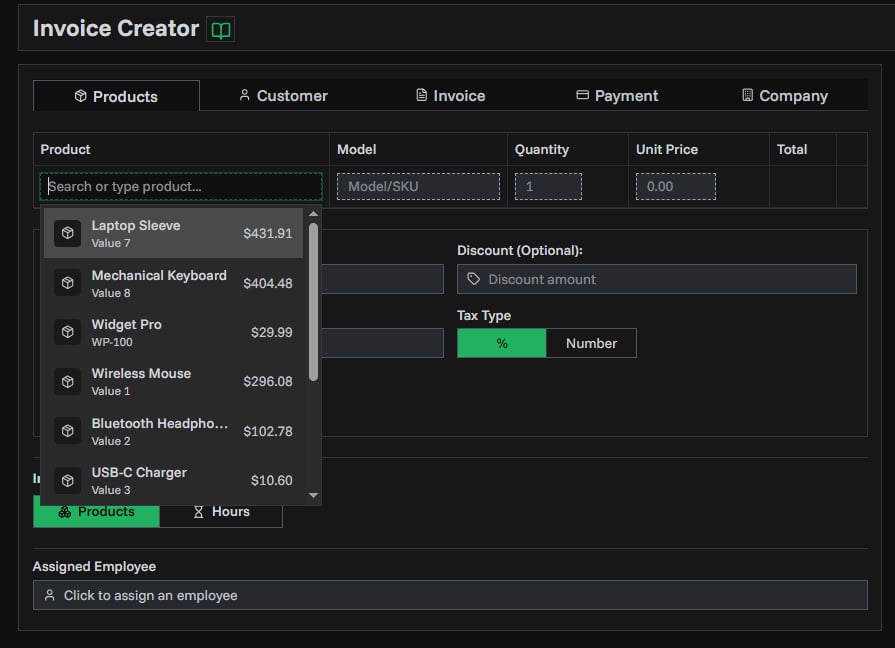
There's now an input row at the bottom of your products table. Start typing a product name and your catalog products appear instantly. Pick one to add it, or keep typing to create a temporary item on the spot — just fill in the price and quantity in the same row and hit Enter.
No more clicking "Add Product", waiting for a dialog, then clicking again. One row, one step.
Edit anything in place
Every field in the products table is now editable with a click:
- Quantity and price — click to change, press Enter to confirm
- Name and model — editable for temporary items you created inline
- Drag to reorder — grab and move items to change the order they appear on your document
Works on mobile
The products table is now fully usable on phones and tablets. On smaller screens, each product shows as a card with tap-to-edit fields for quantity, price, name, and model. Adding new products works the same way — type, search, and add right from your phone.
Available everywhere
These improvements apply across all product tables in PineBill:
- Invoice generator
- Estimate generator
- Recurring invoice setup