API Audit Logs
Guide to accessing and interpreting API audit logs in PineBill for monitoring API usage and security.
Quick Start
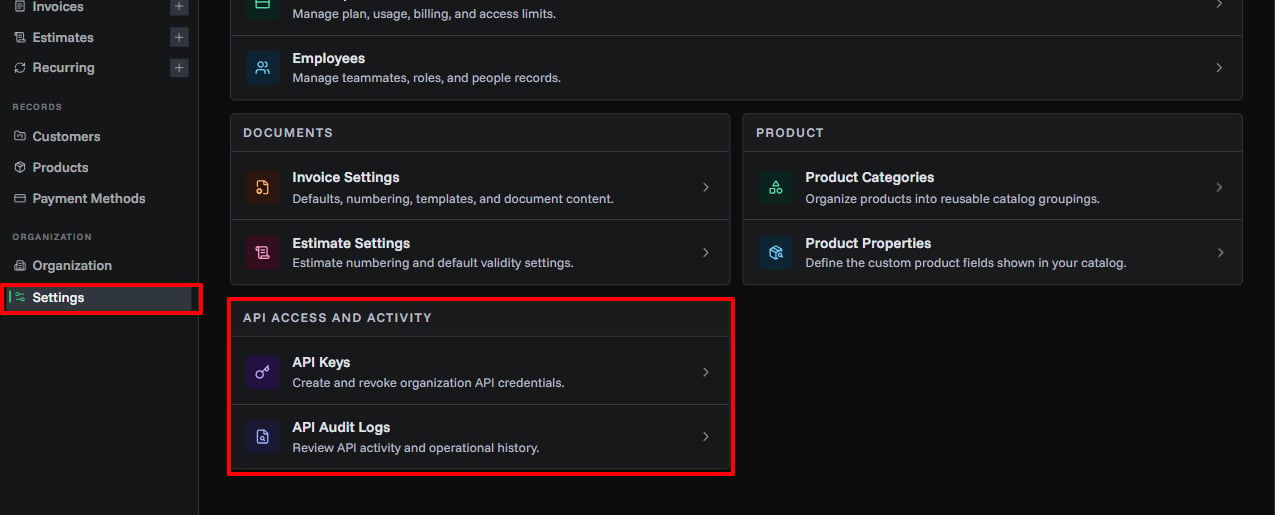
API audit logs provide a comprehensive record of all API requests made to your organization. Monitor usage, debug issues, and detect security threats from Settings → API Access and Activity → API Audit Logs.
Permissions: Organization admins and members can view API logs. Guests cannot access audit logs.
What Are API Audit Logs?
API audit logs record every API request made to your organization, including:
- Request Details: Method, endpoint, timestamp
- Authentication: Which API key was used
- Response Status: Success or error codes
- Network Info: IP address and user agent
- Performance: Request timing and processing
Use cases:
- Monitor API usage patterns
- Debug integration issues
- Detect suspicious activity
- Track API key performance
- Compliance and auditing
- Troubleshoot errors
Viewing API Logs
Accessing the Logs Dashboard
- Open Settings
- In API Access and Activity, click API Audit Logs
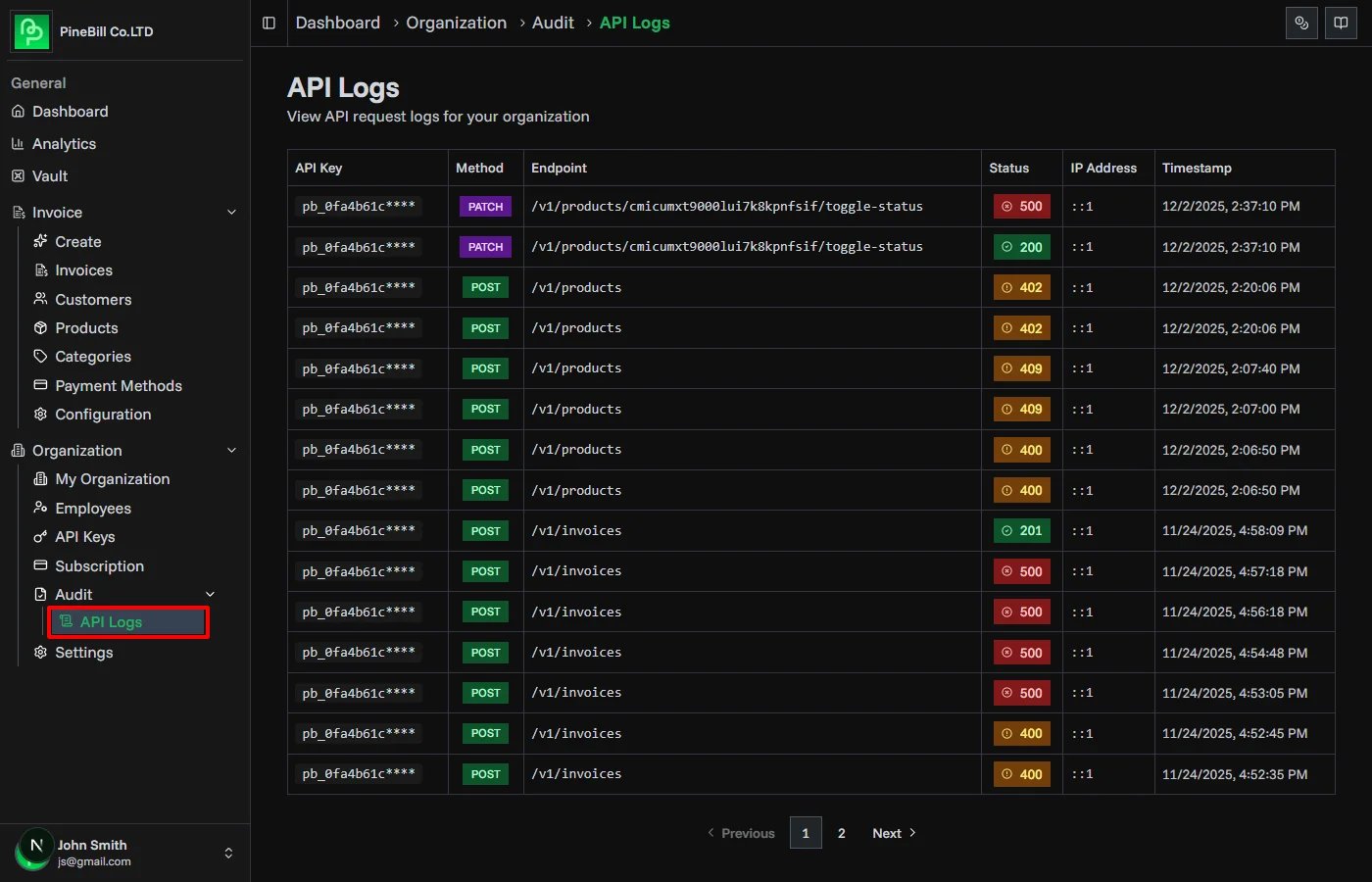
- View recent API requests in chronological order
- Use filters to narrow down results
Log Information
Each log entry displays:
| Field | Description | Example |
|---|---|---|
| Timestamp | When the request was made | Dec 2, 2025 10:30:15 AM |
| Method | HTTP method used | GET, POST, PUT, DELETE |
| Endpoint | API endpoint accessed | /v1/invoices |
| Status | HTTP response code | 200, 404, 500 |
| API Key | Which key made the request | Production API (pbk_...x7f2) |
| IP Address | Request origin | 192.168.1.1 |
Understanding Status Codes
API logs include HTTP status codes indicating request outcomes:
Success Codes (2xx)
| Code | Meaning | Description |
|---|---|---|
| 200 | OK | Request successful |
| 201 | Created | Resource created successfully |
| 204 | No Content | Successful, no response body |
Client Error Codes (4xx)
| Code | Meaning | Common Causes |
|---|---|---|
| 400 | Bad Request | Invalid request format or parameters |
| 401 | Unauthorized | Invalid or missing API key |
| 403 | Forbidden | API key lacks required permissions |
| 404 | Not Found | Endpoint or resource doesn't exist |
| 429 | Too Many Requests | Rate limit exceeded |
Server Error Codes (5xx)
| Code | Meaning | Action |
|---|---|---|
| 500 | Internal Server Error | Contact support if persists |
| 502 | Bad Gateway | Temporary issue, retry with backoff |
| 503 | Service Unavailable | System maintenance or overload |
Common Monitoring Patterns
Detecting Unusual Activity
High Volume of 401 Errors:
- Possible unauthorized access attempts
- Check if API key was leaked
- Review IP addresses for patterns
Spike in Requests:
- Sudden increase in API calls
- May indicate runaway process
- Check for infinite loops in code
Unusual IP Addresses:
- Requests from unexpected locations
- May indicate compromised API key
- Consider geographic restrictions (Enterprise)
Debugging Integration Issues
Consistent 400 Errors:
- Review request format and parameters
- Check API documentation for correct structure
- Validate JSON payloads
Intermittent 429 Errors:
- Rate limit being hit
- Implement exponential backoff
- Distribute load across multiple keys
404 Errors:
- Verify endpoint URL is correct
- Check API version in URL
- Ensure resource IDs exist
Security Monitoring
Best Practices
Regular Reviews:
- Review logs weekly for anomalies
- Set up alerts for suspicious patterns (Enterprise)
- Document normal usage patterns
Key Rotation:
- Rotate API keys every 90 days
- Monitor old key usage after rotation
- Revoke keys showing no activity
Access Control:
- Limit API key creation to admins only
- Review who has access to API keys
- Use separate keys per team/service
Incident Response:
- Identify suspicious activity in logs
- Immediately revoke compromised key
- Create new API key with different name
- Update affected services
- Review logs for extent of breach
- Document incident and response
Suspected Breach? If you suspect API key compromise, revoke the key immediately and contact support.
Troubleshooting
Related Topics
- API Keys - Create and manage API authentication
- API Introduction - Getting started with PineBill API
- Subscription Plans - API usage limits and retention
- API Documentation - Complete API reference