API Introduction
Comprehensive guide to PineBill's RESTful API for integrating and managing your invoicing data.
Quick Start
PineBill provides a powerful RESTful API for programmatic access to invoicing, customer management, and analytics features. Integrate PineBill into your applications, automate workflows, and build custom solutions.
Complete API documentation is available at: api.pinebill.app/docs
What You Can Do With PineBill API
- Generate Invoices: Create and manage invoices programmatically
- Customer Management: Add, update, and retrieve customer information
- Product: Manage your product inventory via API
Getting Started
1. Choose Your Plan
API access is available on Pro and Enterprise plans:
- Trial: 50 API calls/month (testing only)
- Solo: No API access
- Pro: 10,000 API calls/month, up to 10 API keys
- Enterprise: Unlimited API calls and keys
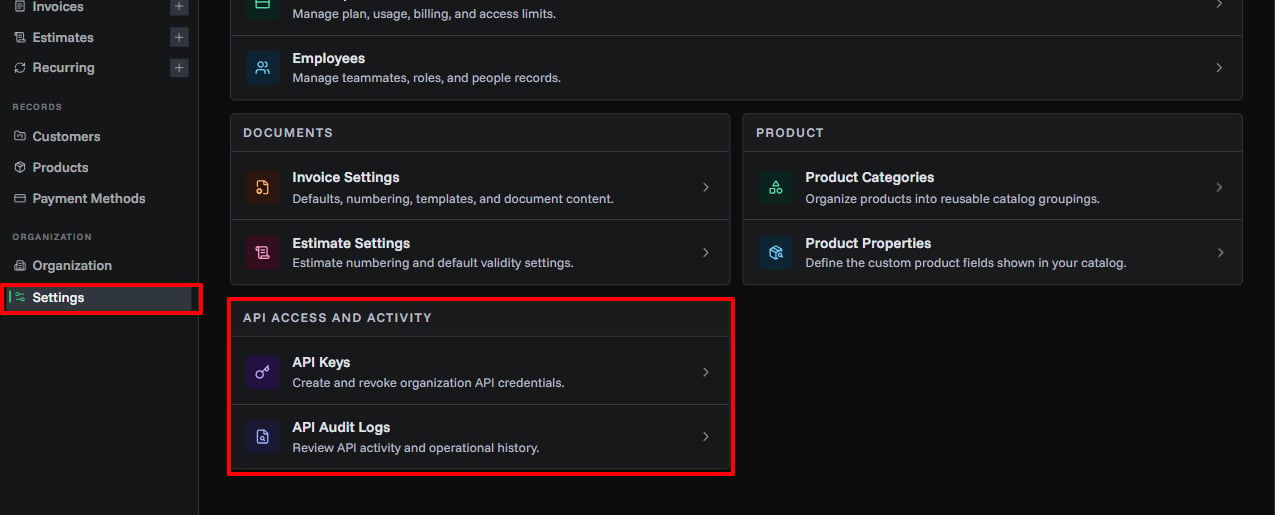
2. Create an API Key
- Open Settings
- In API Access and Activity, click API Keys
- Click Create API Key
- Copy and securely store your key (shown once)
3. Make Your First Request
Use your API key in the X-API-Key header:
curl -X GET https://api.pinebill.app/v1/invoices \
  -H "X-API-Key: pbk_live_your_api_key_here"
4. Explore the Documentation
Visit api.pinebill.app/docs for:
- Interactive API explorer
- Request/response examples
- Authentication details
- Rate limiting information
- Error codes and handling
API Features
Authentication
All API requests require authentication using API keys:
- Include your API key in the
X-API-Keyheader - Keys are unique to your organization
- Revoke compromised keys immediately
Rate Limiting
Requests are rate-limited based on your subscription:
- 60 requests/minute per key for all plans,
- Rate limit headers included in responses
Endpoints
Core API endpoints include:
/v1/invoices- Invoice management/v1/customers- Customer operations/v1/products- Product catalog/v1/analytics- Business metrics/v1/pdf/generate- PDF generation
Full endpoint documentation: api.pinebill.app/docs
Security Best Practices
Keep Your API Keys Secret: Never expose API keys in client-side code, public repositories, or share them publicly.
Recommended practices:
- Store keys in environment variables
- Rotate keys periodically
- Use separate keys for development and production
- Monitor API usage for unusual activity
- Revoke unused or compromised keys immediately
Support & Resources
Documentation
- Interactive API Docs: api.pinebill.app/docs
- OpenAPI Spec: Available at
/docs/jsonendpoint
Need Help?
- Review our comprehensive API documentation
- Check common error codes and solutions
- Contact support for Enterprise API assistance
- Report API issues via GitHub
Related Topics
- API Keys - Create and manage API authentication
- API Audit Logs - Monitor API usage and security
- Subscription Plans - API access by plan tier